Networks & Systems – The IT Guy’s Guide.
Hey everyone, welcome back to “From the Server Room!” . Today in this blog post, we’re diving into the foundational concepts of IT: Networks and Systems. These two terms are often thrown around, but what do they actually mean? And how do they work together? Don’t worry, I’m here to break it down for you.
Think of it like this: a network is how computers talk to each other, and a system is a collection of interconnected components that work together for a specific purpose.
Let’s explore each in more detail without delay.
Networks – A Web of Connections
We can Imagine that the internet as a vast network of roads. Computers, like cars, use these roads to exchange information. But how do they know where to go? That’s where networking comes in.
So, What is a Network?
Simply put, a network is a group of interconnected devices (PCs, Laptops, Desktop Computers, Smartphones, Workstations, Servers, IOTs, etc.) that can communicate and share resources with each other. Computers use common communication protocols over digital interconnections to communicate with each other
Types of Networks:
Networks come in all shapes and sizes. You’ve probably heard of some such as:
- LAN (Local Area Network): A small network, like the one in your home or office. LANs are usually limited to a single location connected within one network.
- WAN (Wide Area Network): A larger network that connects multiple LANs together, often owned and managed by specific organizations. WANs are wide and can span across multiple smaller networks and even locations larger than cities, states, countries, or even continents.
- WLAN (Wireless Local Area Network): WLAN provides wireless connectivity within a limited area (like a home or office)
- VPN (Virtual Private Network): A VPN securely extends access over the public network using secure or encrypted tunnels between different network locations.
- Internet: A massive, global network connecting millions of networks (including WANs and LANs) and devices worldwide. It’s a public infrastructure that anyone can access. No single entity owns or controls it.
Key Network Components:
- Firewalls:
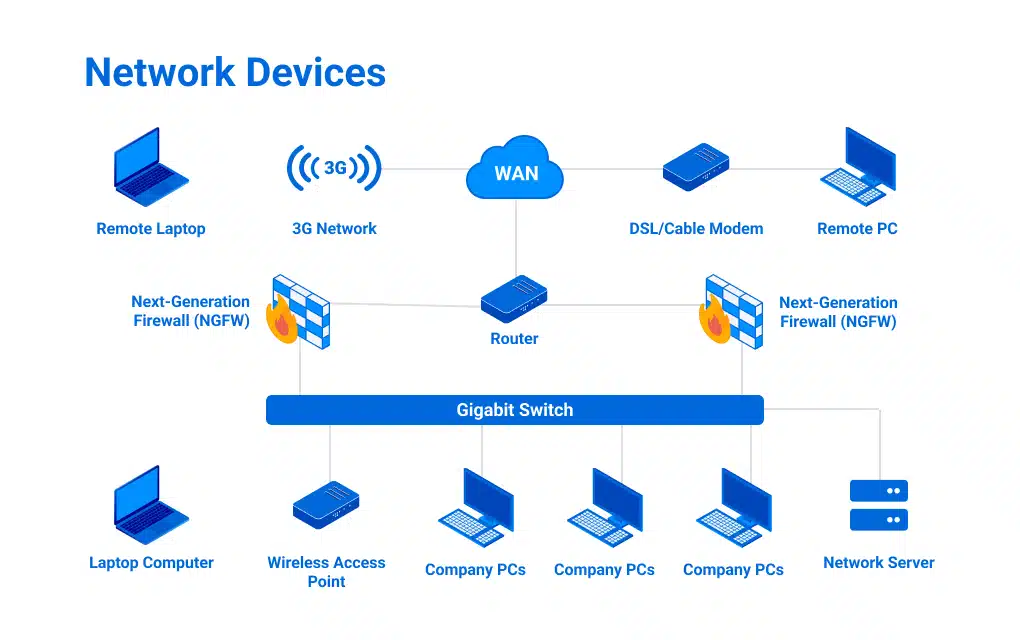
- A hardware firewall is a dedicated device that sits between your network and the outside world (Internet). It acts as a gatekeeper, examining all incoming and outgoing network traffic and blocking anything that doesn’t meet pre-defined security rules. Like a security guard for the network in short it prevents unauthorized access and protects systems from cyber threats.
- Routers:
- Routers are networking devices that direct data traffic between different networks. They act like traffic controllers, determining the best path for information to travel, whether it’s within your local network or across the vast expanse of the internet. Essentially, routers connect networks and ensure data reaches its intended destination efficiently.
- Switches:
- Network switches are devices that connect devices within a local area network (LAN), like computers, printers, and servers. It acts as a central hub, receiving data packets and forwarding them only to the intended recipient, improving network efficiency and thus reducing congestion.
- Servers:
- These are application or storage servers where the main computation and data storage occur. All requests for specific tasks or data come to the servers.
- Cables/Wireless Connections:
- Cables and wireless connections are the physical and wireless pathways that allow devices to connect to a network. Cables, like Ethernet cables, provide a direct, wired connection for data transfer. Wireless connections, such as Wi-Fi, use radio waves to connect devices without the need for physical cables, offering flexibility and mobility. Both serve as the essential link, enabling communication and data exchange between devices within a network.
- Protocols:
- Protocols are the sets of rules that govern how devices communicate on a network. They’re like the agreed-upon language and grammar (like TCP/IP, the language of the internet) that computers use to understand each other, ensuring that data is transmitted and received correctly. In other words without protocols, network communication would be chaotic and unreliable.
Systems – Operating as an integrated system
A system is more than just a single computer. It’s a collection of interconnected components (hardware and software) that work together to achieve a specific goal.
What makes a system?
Think of your company’s IT infrastructure. It includes servers, computers, software applications, databases, and all the network connections that tie them together. It’s a system designed to support your business operations.
Types of Systems:
Systems can be categorized in various ways:
Operating Systems (OS): The software that manages a computer’s hardware and resources (Windows, macOS, Linux, OpenBSD).
Database Systems: Used for storing and managing data (MySQL, PostgreSQL).
Web Servers: Host websites and web applications (Apache, Nginx).
System Administration: This is the art (and sometimes the headache) of managing and maintaining these systems to ensure they’re running smoothly and securely.
How Networks and Systems Work Together
Networks and systems are intertwined. Systems rely on networks to communicate and share data, and networks are often composed of various interconnected systems. For example, a web application (a system) running on a server needs a network to be accessible to users.
Why Should You Care?
Understanding networks and systems is crucial in today’s digital world. Whether you’re a business owner, a tech enthusiast, or just someone trying to navigate the complexities of technology, a basic understanding of these concepts will empower you to make informed decisions and appreciate the technology that surrounds us.
What’s Next?
In future posts, we’ll delve deeper into specific networking and system administration topics, exploring everything from network security and cloud computing to server management and troubleshooting tips. Stay tuned for more insights from the server room!
Have any questions or topics you’d like me to cover? Let me know in the comments below!
Leave a Reply